Roblox error code 429: How to fix It quickly
If you're experiencing issues with Roblox Error Code 429, we know how to fix it.


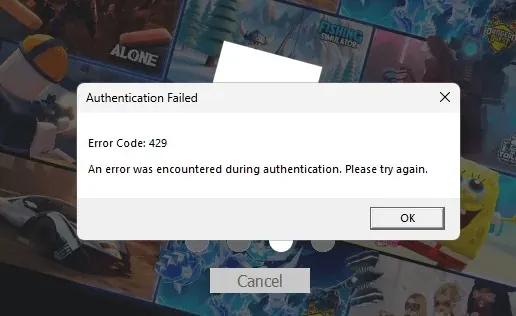
When Roblox error code 429 appears, it indicates that too many requests have been made to its servers from your device, account, or network within a short period. It is a rate limit. The block is temporary and usually clears once you slow down and try again after a brief cool-down.
What 429 actually means
Be aware that Roblox error code 429 is not a ban. It is a ‘too many requests’ response that kicks in when you repeatedly join, reload, log in, or when an app or plugin hammers an API. Many Roblox services also include a Retry-After window for automated clients. In plain terms, pause, then retry cleanly.
Do a 30-second check
- Stop repeating the action. Close the app or Studio and wait a few minutes.
- Try one clean join. Do not server hop rapidly.
- Check if others see it. If friends hit the same error across games, it could be a broader issue.
Fixes for players (PC, mobile, console)
- Wait out the cool down, then retry once. Most rate limits lift on their own.
- Restart Roblox or Studio. Open once, not ten times in a row.
- Log out and in after the pause if the login screen keeps failing.
- Turn off VPN or proxy for testing. Some routes look noisy and trigger rate limits.
- Power cycle your router to refresh the connection. A new IP can sidestep a temporary network block.
- Try a different network or device to rule out a local issue.
- Avoid rapid server hopping once you are back in.
Fixes for creators (Studio and web APIs)
If you are developing, treat the Roblox error code 429 as a signal to slow your code.
- Throttle requests from HttpService or external tools. Queue them and spread them over time.
- Respect Retry-After and back off with exponential delays.
- Cache responses that do not occur frequently. Watch your environment. Some hosts or proxies may get rate-limited faster than local machines, so test from different origins.
- Pace plugins and test loops so they are not firing requests every frame.
When it is on Roblox’s side
Sometimes you do everything right and still hit Roblox Error code 429 across multiple games or Studio. Treat that as service-side throttling. Wait, try again later, and avoid constant retries that extend the cool-down. If the error persists for a prolonged period across devices, assume a broader issue and check again after a brief break.
Safe habits to prevent Roblox Error Code 429 next time
- Join once, settle in, and avoid bouncing through servers.
- Keep background scripts and overlays from polling too often.
- On Studio projects, budget your API calls, queue them, and test with realistic intervals.
- Give failed joins a minute before retrying.
Quick playbook
- Roblox error code 429 means rate limit. Pause for a few minutes.
- Make a single clean attempt.
- If you build or script, throttle and respect the Retry-After header.
- If it persists across devices and games, assume service-side and try later.
Follow this routine and you spend less time fighting the Roblox error code 429 and more time playing or building.
The CodesRaid team is always here for you. We closely monitor common errors and code issues across Roblox and update our guides promptly whenever changes occur so that you can avoid the same headaches next time. Bookmark your favourite pages, check back after patches, and if you spot a new issue first, please tell us, and we will roll out a fix and refresh our articles to help everyone stay ahead of the problem.
We’ll keep the list fresh so you don’t have to waste time hunting through socials (okay, maybe one social can be our official Instagram page). To improve your progress in similar games, visit our dedicated Game Codes page.

Editorial & Verification Notice
Content on CodesRaid is produced through a collaborative process involving research contributors, editorial contributors, and technical oversight. Codes are tested in-game where possible and otherwise verified using official developer sources and trusted community channels. Articles are reviewed and updated regularly to maintain accuracy.
Content on CodesRaid is produced through a collaborative process involving research contributors, editorial contributors, and technical oversight. Codes are tested in-game where possible and otherwise verified using official developer sources and trusted community channels. Articles are reviewed and updated regularly to maintain accuracy.